Your Positions
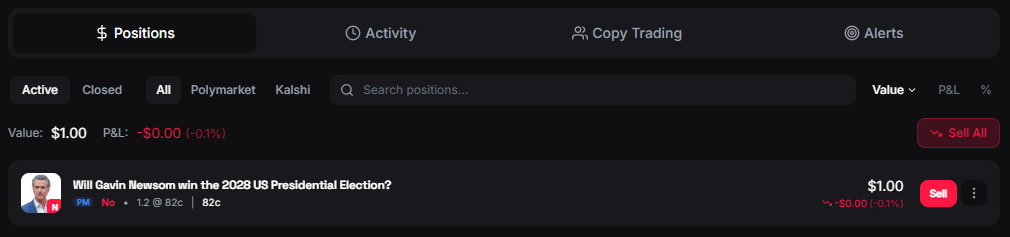
The Positions tab shows every market you currently have an active trade in. Both Polymarket and Kalshi positions appear in a unified view.Position Data
Each position shows:| Data | Description |
|---|---|
| Market | Market title and image |
| Outcome | Which side you hold (Yes/No) |
| Shares | Number of shares owned |
| Entry Price | Your average price per share |
| Current Price | Live market price |
| Invested | Total amount spent |
| Current Value | What your shares are worth now |
| Unrealized PnL | Profit or loss if you sold now |
| PnL % | Percentage gain or loss |
| Outcome | Result |
|---|---|
| Your side wins | Each share pays $1.00 → Redeem for USDC |
| Your side loses | Shares are worth $0 |
Position Actions
From any position you can:- Sell — Open the trading modal to sell some or all of your shares
- View Market — Go to the full market page with charts and orderbook
- Share — Generate a PnL card image to share on social media or the FrenFlow feed
Redeemable Positions
When a market resolves and you hold winning shares, your position becomes redeemable. Winning shares are worth $1.00 each.- A badge shows how many positions are ready to redeem
- Click Redeem to claim your winnings
From Telegram
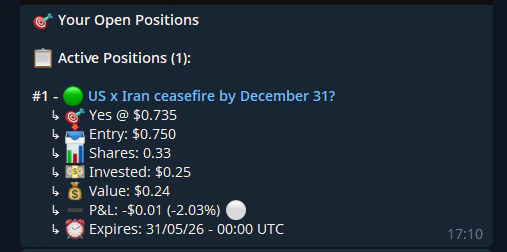
View your positions from the bot with/positions. You’ll see each position with current PnL, entry price, and sell buttons. You can also:
- Sell partial or full positions directly
- Redeem all resolved winning positions
- Cancel open limit orders
- Navigate between positions with pagination buttons